ON-SITE DIGITAL VAULTS

Privileged Account Password Rotation
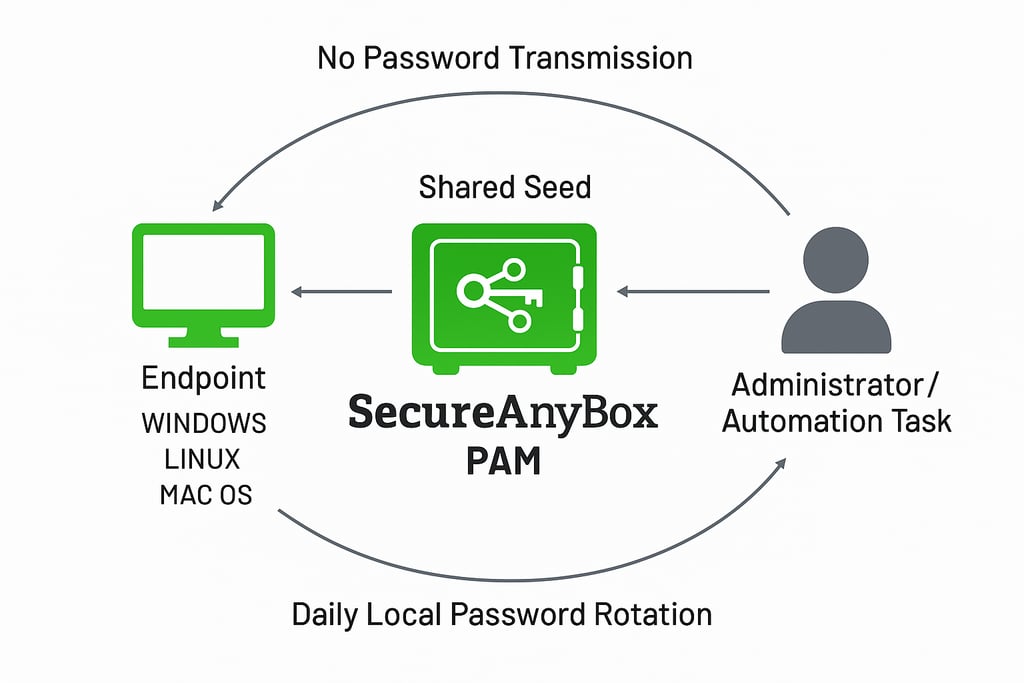
SecureAnyBox includes an Agent for Windows, Linux, and macOS that can automatically rotate local administrator accounts on a daily schedule. The key to this feature is that the password is not transmitted from the Agent to the Server. Instead, both the Agent and the Server generate the password independently using a shared seed.
SecureAnyBox Privileged Account Password Rotation
When an administrator needs the current password for a particular machine, they simply reveal it in SecureAnyBox. The Server computes it on demand and shows it to the authorized user.
This model solves a traditional problem with password management systems. With solutions like Microsoft LAPS, the endpoint must successfully communicate the newly rotated password back to Active Directory. If the machine is offline, disconnected, or isolated, the server never receives the updated password, and administrators cannot get access to the local admin password.
# --- Demo: visibly type Administrator password, then authenticate ---
# Author: tay@usasab.com
# Purpose: Test Windows priviledged account password rotation feature in SecureAnyBox
#
# PowerShell interpreter to use
$psExecutable = "C:\Windows\System32\WindowsPowerShell\v1.0\powershell.exe"
$user = "Administrator"
Write-Host "Enter password for '$user' :"
# Collect visible input
$pw = ""
while ($true) {
$key = [Console]::ReadKey($true)
if ($key.Key -eq 'Enter') { break }
$pw += $key.KeyChar
Write-Host -NoNewline $key.KeyChar # echo what’s typed
}
Write-Host "" # newline
# Convert to credential object
try {
$sec = ConvertTo-SecureString $pw -AsPlainText -Force
$cred = New-Object System.Management.Automation.PSCredential($user,$sec)
# Launch a new PowerShell window running as Administrator
Start-Process $psExecutable -Credential $cred -ArgumentList '-NoExit','-Command','Write-Host "Authenticated as:"; whoami; whoami /groups'
}
catch {
Write-Host "❌ Login failed: $($_.Exception.Message)"
}
PowerShell script used in the demo (credential_test.ps1)